02FOR THE “ONE LAST THING” SURVIVORS

Leave at6.

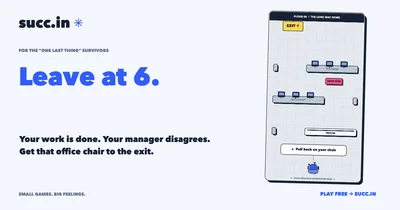
Your work is done. Your manager disagrees. Get that office chair to the exit.

8 FLICKS TO FREEDOM

THE VERY SHORT VERSION

  1. Pull back on the chair. Let go to launch.
  2. Wait for it to stop, then take your next shot.
  3. Reach the yellow exit. Avoid the quick sync.

Left/right to aim. Up/down for power. Space to flick.

Another game. Another perfectly good excuse.
EST. YOUR LUNCH BREAK
Ready?
This game requires a browser with Canvas 2D support.

A browser-sized break from being a person.

MEET YOUR NEXT BAD IDEA

An office escape game for “one last thing” survivors.

Leave at 6 is a free physics game where your office chair is your escape vehicle. Pull back, aim and flick it toward the yellow exit. You have eight shots, 60 active seconds, office obstacles and one deeply inconvenient quick sync between you and freedom. It is a little desk-game nostalgia with an adult-sized reason to leave.

How to play Leave at 6

  1. Drag back from the chair and release to launch it. On a keyboard, use left and right to aim, up and down to change power, and Space to flick.
  2. Wait until the chair stops before the next shot. Use the layout and rebounds to line up a path to the yellow exit.
  3. You have up to eight flicks and 60 active seconds from the first shot. Reach the exit before either runs out, then challenge a friend to the same office layout.
Back to the game ↑
Leave at 6 game: an office chair must pass desks and obstacles to reach a yellow exit.
Leave at 6. Free to play in your browser.

Before your next round

Is Leave at 6 a timed game?

Yes. You get up to eight flicks within 60 active seconds. The timer starts with the first shot. Wait for the chair to stop before shooting again, and use Pause if you need a break.

Can I play without a mouse?

Yes. Touch controls work on a phone. On a computer, arrow keys control aim and power, and Space launches the chair.

Is this a pen-fighting game?

No. It shares the satisfying pull-and-flick feel of a desk game, but the goal here is to launch an office chair to an exit through a physics-based obstacle course.

How do I share this challenge on X or Instagram?

Finish your round and use Post to X or Instagram Story on the result screen. Your invite link and its target score lead friends back to this exact game setup. On Instagram, add the copied link as a Link sticker.

Can I challenge a friend to escape the same office?

Yes. Your result link opens the same office layout and seed with your reported target score. Friends can play on a phone or computer and send a rematch. Shared scores are casual and unverified.

Another perfectly good excuse.

Make it a score challenge. Finish a round, invite a friend and compare results. How to share game scores on X, Instagram Stories and more →

A very small escape.

Sound is optional. Your best score stays on this device. Shared links give friends the same starting challenge.

Need a break from your break? Use the pause button.

Put your bad decisions on Stories.

Your portrait score card with space for an Instagram Link sticker
  1. Copy your challenge link.
  2. Share or save the image, then add it to an Instagram Story.
  3. In Instagram, add a Link sticker, paste the link and call it BEAT THIS.

The Link sticker makes it clickable. You choose the app and publish the Story.

Open Instagram ↗

Your challenge link

Copy this link and pass the break along.